.svg)
Domain & DNS - How to Add Grux as an Administrator in Your Domain Hosting Provider/Registrar
This article outlines the steps on how to add Grux as an Admin in your Domain Hosting Provider/Registrar.
- Login
- Sign in to your Domain Hosting Provider/Registrar
- Access Account Settings:
- Look for ‘Account Settings’, or ‘Domain Management’, or similar
- Look for ‘Account Settings’, or ‘Domain Management’, or similar
- Find the Permissions Area:
- Locate a section titled ‘Delegate Access’, ‘Manage Users’, or similar
- Invite a New User:
- Click the button labeled ‘Invite Members’, ‘Add User’, or similar
- Click the button labeled ‘Invite Members’, ‘Add User’, or similar
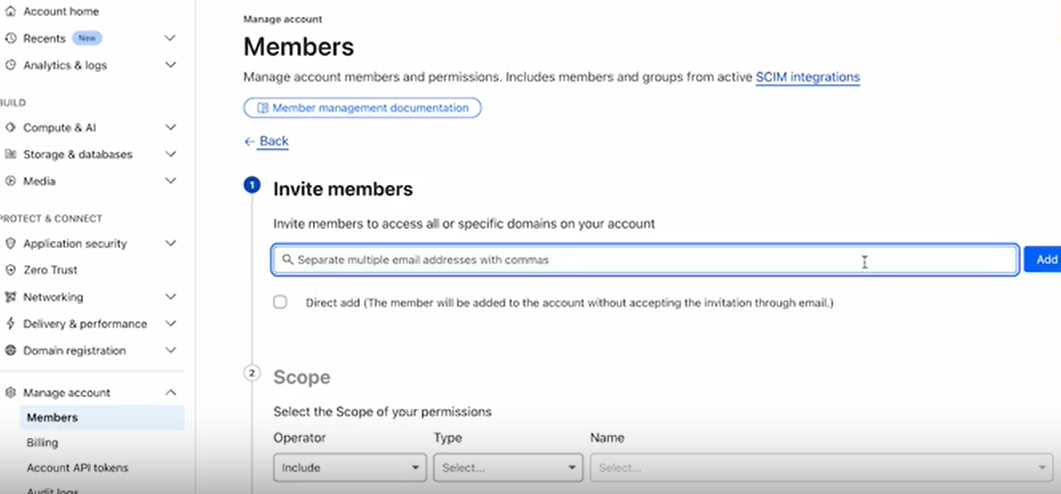
-
- Enter Our Details:
- Name: Grux
- Email: drive@[yourcompanydomain]
- Assign Grux the Role of Super Admin:
- Select the role of ‘Administrator’, ‘Full Access’, or similar
- Select the role of ‘Administrator’, ‘Full Access’, or similar
- Confirm and Send:
- Click ‘Invite’ or ‘Save’
- Click ‘Invite’ or ‘Save’
- Notify us:
- Once the invitation has been sent, please notify us at support@grux.io

